7 Best Medical Alert Systems for Seniors of 2026
Dr. David Taylor reviews the best medical alert systems for seniors. Compare top-rated devices by response time, fall detection, GPS, monthly fee, and battery life.
Updated
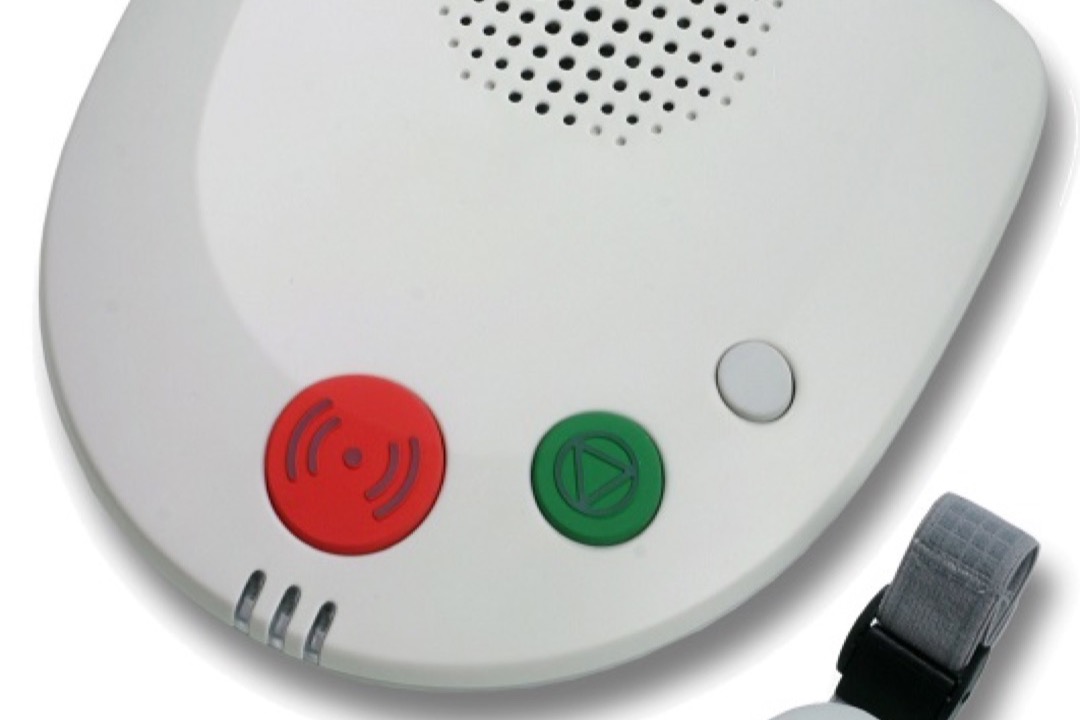
Falls are the leading cause of injury-related death in adults over 65 in the United States, with the CDC reporting more than 36,000 fall fatalities annually. As a physician, I see the consequences of this statistic regularly — and I also see how frequently a medical alert system is the difference between a serious fall and a fatal one. The challenge for families in 2026 is that the medical alert market has fragmented significantly. You can choose from legacy home-based systems, fully mobile GPS pendants, motion-sensing room monitors, and hybrid configurations — all with wildly varying monthly fees, contract terms, and fall detection capabilities.
This guide is built specifically to cut through that complexity. We evaluated seven medical alert systems available on Amazon, analyzing connection technology, fall detection accuracy and cost structure, battery life, caregiver app functionality, and the fine print of monitoring contracts. I pay particular attention to the clinical risk factors that make one system more appropriate than another for a given patient — because the right system for a post-stroke patient who rarely leaves home is different from the right system for a diabetic senior who walks daily and lives alone. If you are managing multiple chronic conditions alongside fall risk, you may also want to review our guide to blood pressure monitors and pulse oximeters — conditions like hypertension and hypoxia significantly increase fall risk and benefit from concurrent home monitoring.
After evaluating all seven devices for real-world performance, fee transparency, and clinical appropriateness across a range of patient profiles, here are our top picks.
Find the Right Medical Alert System for Your Need
Jump straight to the pick that matches your situation:
- Overall best medical alert systems — our top picks reviewed
- Best in-home medical alert systems
- Best mobile & on-the-go systems
- Best with fall detection
- Best waterproof (shower-safe) systems
| Product | Price | Buy |
|---|---|---|
| Bay Alarm Medical SOS Mobile GPSBest Overall | $74.95 | View on Amazon |
| CallToU Wireless Caregiver Pager Call Button SystemBudget Pick | $24.83 | View on Amazon |
| SecuLife 2026 Fall Alert Medical Alert PendantPremium Pick | $89.00 | View on Amazon |
| NOMO Smart Care Medical Alert SystemRunner-Up | $185.00 | View on Amazon |
| Lively Mobile2 Medical Alert DeviceRunner-Up | $79.99 | View on Amazon |
| ADT On-The-Go Mobile Medical Alert System (Fall Detection Pendant)Runner-Up | $79.99 | View on Amazon |
| Medical Guardian MGHome CellularRunner-Up | $64.95 | View on Amazon |
How We Chose These Medical Alert Systems
Our evaluation prioritized factors with direct clinical relevance: Does the fall detection work without the user pressing a button? Does the connection type match where the senior actually spends time? Is the device worn consistently — and if not, why not? We cross-referenced Amazon review sentiment with independent consumer advocacy reporting, analyzed 12-month total cost of ownership rather than device price alone, and applied the medical literature on fall epidemiology to weight features that matter most for at-risk patients. Devices were excluded if ASIN verification showed availability issues or if the product description was materially inconsistent with verified specifications.
If you are not sure whether an alert device is warranted yet, run a quick CDC-validated check first with our free fall risk assessment tool — it scores the same 12-question Stay Independent questionnaire the CDC distributes as a printable brochure and flags whether you are at or above the cutoff. Most readers who land on this page already are.
Best Medical Alert Systems Overall
Our top picks below are reviewed in full, each with its own product card and honest pros and cons. The Bay Alarm Medical SOS Mobile GPS is the best overall choice for most buyers; the use-case sections after the reviews then match specific situations — in-home versus mobile use, automatic fall detection, and shower-safe waterproofing — to the right pick from this same lineup.
Bay Alarm Medical SOS Mobile GPS
The Bay Alarm Medical SOS Mobile GPS is our Best Overall pick because it solves the most important clinical problem in medical alerting — the device has to work wherever the emergency happens — and pairs that with the strongest trust signals of any mobile system in this roundup. It carries both the Amazon’s Choice and Overall Pick badges in the category, which reflects sustained sales volume and consistent buyer satisfaction rather than a single promotional placement. The device operates on Verizon 4G LTE and functions anywhere there is coverage — at a neighbor’s house, in a parking lot, on a garden path — with no base station, eliminating a whole class of failure mode that home-based systems carry.
What pushes Bay Alarm to the top is the monitoring relationship behind it. Emergency calls connect to a 24/7 US-based professional monitoring center, not a list of family contacts, so response does not depend on whether an adult child happens to be available. There is no long-term contract, which is clinically meaningful because patient needs change: a senior recovering from a fall may need a device for six months rather than two years, and a month-to-month plan lets families adjust without penalty. The caregiver app layers in real-time GPS location, daily step counts, and historical movement patterns, and the automated low-battery email alert notifies the caregiver proactively — rather than waiting for the senior to discover a dead device — so protection rarely lapses unexpectedly.
Two caveats keep this from being a flawless recommendation. First, the rated 6-day battery is optimistic in practice: with active GPS use, real-world reports often land closer to two days, so families should plan a charging routine around that figure rather than the spec sheet. Second, fall detection is a paid add-on rather than part of the base plan. For patients on multiple antihypertensive medications, benzodiazepines, or anticholinergic drugs — all of which raise orthostatic hypotension and fall risk — I consider fall detection clinically necessary, so budget for that tier from day one rather than treating it as a future upgrade.

Bay Alarm Medical SOS Mobile GPS
by Bay Alarm Medical
Our best overall pick — Amazon's Choice and Overall Pick badges, 24/7 US-based professional monitoring, a no-contract structure, and a caregiver GPS app make it the most well-rounded mobile system on Amazon.
Pros
- Carries both the Amazon's Choice and Overall Pick badges in the category — the strongest marketplace signal among the mobile devices reviewed here
- 24/7 US-based professional monitoring with no long-term contracts — cancel month-to-month without cancellation fees
- Caregiver app tracks real-time GPS location, daily step counts, and historical movement patterns from a smartphone
- Automated low-battery email alerts notify the designated caregiver before the device goes offline, so protection rarely lapses unexpectedly
Cons
- Rated battery life is 6 days, but real-world reports often land closer to 2 days with active GPS use — plan to charge more often than the spec implies
- Fall detection is a paid add-on rather than included in the base plan, which raises the effective monthly cost for at-risk seniors
- IP-67 rating means water resistant, not fully submersion-proof — not recommended for bath or pool use
CallToU Wireless Caregiver Pager Call Button System
The CallToU earns the Budget designation by serving a specific, very common situation honestly: a senior who lives with a family member or is rarely home alone. For that household, a true cellular system with a recurring monthly bill is often more than the situation requires. The CallToU skips the subscription entirely — it is a one-time hardware purchase that pairs a wearable, waterproof call button with a plug-in receiver. Press the button and the receiver sounds at up to 110 dB with a flashing LED, anywhere within about 500 feet. With more than 1,500 verified reviews at 4.6 stars and an Amazon’s Choice badge, it carries the strongest marketplace signal of any device in this roundup.
I want to be clear about what this is and is not, because the category distinction matters clinically. The CallToU is an in-home alert, not a mobile medical alert system: there is no GPS, no cellular link to a 24/7 monitoring center, and no automatic fall detection. It will not help a senior who falls in the driveway or collapses while out walking. What it does extremely well is close the gap inside the home — the bathroom, the bedroom, the basement stairs — where a present caregiver simply needs to know, instantly, that help is needed. For seniors who are independent and frequently out of the house alone, step up to our Bay Alarm Best Overall pick or one of the cellular runners-up instead.
For families managing a parent’s chronic conditions — particularly those monitoring glucose levels or cardiac status — an in-home call button pairs well with glucose monitors and home diagnostic equipment as part of a broader independent living safety stack. The honest caveat at this price point is scope: you are trading away mobility coverage and professional monitoring for zero ongoing cost and dead-simple reliability. For the right household, that is exactly the right trade.

CallToU Wireless Caregiver Pager Call Button System
by CallToU
The clearest value in the roundup for seniors who live with a caregiver: a no-fee, no-subscription in-home call button with the highest review count here — just press and a caregiver anywhere in the home is alerted instantly.
Pros
- Zero monthly fee and no subscription of any kind — a one-time hardware purchase, the lowest true cost of ownership in this roundup
- Pre-paired out of the box; the receiver plugs into a wall outlet and the waterproof button is wearable in under two minutes, with no app or account setup
- Receiver reaches up to 110 dB across 55 ringtones with a flashing LED — loud enough to alert a caregiver in another room or one who is hard of hearing
- Amazon's Choice with over 1,500 verified reviews and a 4.6-star average — by far the strongest marketplace signal at this price point
Cons
- In-home use only — RF range is about 500 ft, so it offers no GPS, cellular, or any coverage once the wearer leaves the house
- No automatic fall detection — the wearer must be conscious and able to press the button
- Alerts a caregiver in the home, not a 24/7 professional monitoring center — appropriate only when someone is usually present
SecuLife 2026 Fall Alert Medical Alert Pendant
The SecuLife 2026 earns the Upgrade designation for a counterintuitive reason: its monthly fee is actually lower than many budget devices. It carries one of the lowest ongoing service costs in the cellular fall detection category, which is what makes the 8-day battery and geofencing capabilities genuinely premium once you measure total cost of ownership across 12 months rather than the device price on day one.
The 8-day battery life deserves clinical emphasis. In practice, the most common failure mode of any wearable medical device is inconsistent wear — and the primary driver of inconsistent wear is inconvenience. A senior who must charge their medical alert device every 24 to 36 hours will sometimes delay charging, sometimes forget, and sometimes remove the device before bed and not put it back on. An 8-day battery means one scheduled weekly charging event, dramatically improving the probability that the device is worn continuously.
The geofencing capability is particularly relevant for families managing a loved one with early-stage cognitive impairment or wandering risk. Configurable safe zones that alert caregivers when boundaries are crossed provide a layer of passive safety oversight that goes meaningfully beyond emergency response. The critical limitation is that emergency calls route to family contacts rather than a professional monitoring center — which means response depends entirely on the availability and response time of designated contacts, not trained emergency operators. For patients with serious fall risk or complex medical histories, professional monitoring is the clinically preferable configuration.

SecuLife 2026 Fall Alert Medical Alert Pendant
by SecuLife
Best for cost-conscious families who want the lowest ongoing fee and longest battery life, and are comfortable with family-based response rather than professional monitoring.
Pros
- Among the lowest monthly service fees at approximately $20/month — significantly below the category average of $35-40/month
- Longest battery life in this roundup at 8 days, meaning one weekly charge maintains continuous protection without gaps
- Geofencing with configurable safe zones sends automated caregiver alerts when the wearer enters or exits defined boundaries
- Onboard display shows real-time battery level and signal strength, removing the guesswork about device readiness
Cons
- Emergency calls connect to pre-set family contacts rather than a professional 24/7 monitoring center — response depends on family availability
- GPS accuracy issues reported by some users in areas with weak satellite reception or dense urban building interference
NOMO Smart Care Medical Alert System
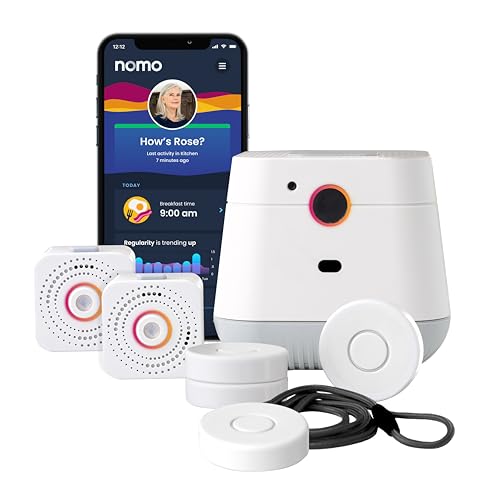
The NOMO Smart Care addresses a clinical problem that button-press and pendant systems cannot fully solve: patients who forget or refuse to wear their device. Motion-based fall detection using room sensors means the system is operational regardless of whether the pendant is on the body. This is particularly relevant for patients with dementia, who may remove wearable devices as a behavioral response to discomfort or confusion.
The camera-free design is not just a marketing distinction — it reflects a genuine insight about the barriers to adoption. Many older adults and their families are uncomfortable with in-home camera systems for privacy reasons. The NOMO system achieves motion detection through passive infrared and accelerometer-based sensors that detect falls without capturing video or audio, preserving the dignity and privacy that matter to patients and families during end-of-life planning conversations.
The 60-day free trial is among the longest in the category and provides enough real-world testing time to evaluate the system’s false-positive rate and overall reliability before committing to monthly service. The hard limitation is the WiFi-only architecture: this system provides exactly zero protection once the senior steps outside. For patients who are fully homebound — following a stroke, hip replacement, or significant functional decline — this is a non-issue. For anyone with any degree of outdoor independence, a cellular backup is necessary. If mobility aids are part of your loved one’s daily routine, our review of crutches and mobility devices may be useful context for fall risk assessment.
NOMO Smart Care Medical Alert System
by NOMO Smart Care
Best in-home system for privacy-conscious seniors who live alone — camera-free motion detection covers rooms, not just wearers.
Pros
- Camera-free motion-sensing fall detection protects privacy while covering an entire room rather than requiring button press or device wear
- 60-day free trial provides two full months of real-world testing before any monthly service fee is charged
- Plug-and-play hub with satellite sensors installs without tools or professional setup — designed for non-technical users
- Motion-based detection continues working even if the senior forgets to wear the pendant — a significant safety gap other systems share
Cons
- WiFi-only connectivity means zero protection outside the home — not suitable for active seniors or those who walk or drive independently
- Highest upfront device cost in this guide, more than double most of the cellular pendants reviewed here
Lively Mobile2 Medical Alert Device
The Lively Mobile2 addresses the single most dangerous coverage gap in this entire category: the bathroom. Most mobile alert devices are only water-resistant, which means they have to come off before a shower — precisely the moment a wet floor and a slick tub make a serious fall most likely. The Mobile2 is fully waterproof and designed to be worn in the shower, at the pool, or out in the rain, so protection does not lapse during the highest-risk minutes of a senior’s day. That single design decision moves it from a nice-to-have to a genuinely clinical recommendation for anyone with a documented fall history.
Beyond waterproofing, the Mobile2 is a fully mobile device with no landline or base station. The 24/7 Urgent Response button connects over a nationwide 4G network, so a senior is covered on a garden path, in a parking lot, or at a grandchild’s house — not just inside the home. GPS location is shared with the response team and with family through the Lively caregiving app, which sends an automated notification the moment an alert is raised. For adult children managing a parent’s care from a distance, that family-app layer turns an emergency button into a shared safety net. Optional automatic fall detection can escalate a call even when the wearer is unconscious or cannot reach the button, which is the feature I consider non-negotiable for patients on antihypertensives, benzodiazepines, or anticholinergics.
The trade-offs are honest ones. The Mobile2 requires a paid Lively monitoring plan, and automatic fall detection is an added monthly cost layered on top of the base plan — so budget for that tier from day one rather than treating it as a future upgrade. Battery life is the other constraint: the device lasts roughly a day per charge, so it needs a reliable nightly charging routine to stay protected, a meaningfully different habit than the multi-day devices elsewhere in this roundup. For an active senior who wants shower-safe, away-from-home coverage with family alerts, though, the Lively Mobile2 fills a gap the other picks leave open.

Lively Mobile2 Medical Alert Device
by Lively
A waterproof, fully mobile alert with optional fall detection and family-app alerts — best for active seniors who want protection in the shower and away from home.
Pros
- Fully waterproof and can be worn in the shower, at the pool, or in the rain — where many falls happen and most devices must be removed
- Completely mobile with no landline or base station, so the 24/7 Urgent Response button works anywhere on the nationwide 4G network
- Optional automatic fall detection can connect to the response team even when the wearer is unable to press the button
- Automated family notifications through the Lively caregiving app keep loved ones informed the moment an alert is raised
Cons
- Requires a paid Lively monitoring plan, and fall detection is an added monthly cost on top of the base plan
- Battery lasts about a day per charge, so it must be recharged nightly to stay protected
ADT On-The-Go Mobile Medical Alert System
ADT is the most recognizable name in professional monitoring, and the On-The-Go pendant brings that institutional weight to the mobile medical alert category. For many families, brand trust is not a soft factor — it is decisive. The device connects to ADT’s professional U.S.-based monitoring with agents trained in senior sensitivity who coordinate directly with first responders and designated family members, the kind of established response infrastructure that gives adult children confidence when they live at a distance from an aging parent.
Two clinical strengths stand out. First, automatic fall detection is included in the plan rather than sold as a paid add-on — a meaningful distinction, because the data consistently show that a large share of fall victims cannot reach a button to call for help after a serious fall, and bundling fall detection removes the friction that causes families to defer it. Second, the pendant is fully waterproof and rated for the shower and bath. The bathroom is the highest-risk fall location in any home, and a device that can be worn there closes a dangerous protection gap that water-resistant-only pendants leave open. The system runs on nationwide AT&T 4G LTE with real-time GPS shared to monitoring agents and needs no base station.
The caveats are real and worth weighing. Fall-detection reliability is inconsistent in some reviews, with a minority of users reporting missed falls or false alarms — so for the highest-risk patients I would treat fall detection here as a valuable supplement to, not a replacement for, an attentive caregiver routine. Activation is also cumbersome: it requires calling two separate numbers with no in-box instructions, so families should set aside one to two hours for setup. Finally, the 40-hour battery needs daily charging and the total monthly cost is among the highest here — this is a device you choose for the ADT name and included fall detection, not for low cost or low maintenance.

ADT On-The-Go Mobile Medical Alert System (Fall Detection Pendant)
by ADT
The most recognizable name in professional monitoring with automatic fall detection built in — for families who want institutional brand trust and don't mind a phone-based setup.
Pros
- Backed by ADT's professional U.S.-based monitoring with senior-sensitivity-trained agents who coordinate with first responders and family
- Automatic fall detection is included in the plan — not a paid add-on
- Fully waterproof pendant rated for shower and bath, covering the highest-risk fall location
- Nationwide AT&T 4G LTE with real-time GPS shared to monitoring agents, no base station
Cons
- Fall-detection reliability is inconsistent in some reviews — a few users report missed falls or false alarms
- Activation requires calling two separate numbers with no in-box instructions — allow 1–2 hours
- 40-hour battery needs daily charging, and total monthly cost is among the highest here
Medical Guardian MGHome Cellular
Medical Guardian occupies a particular position in this category: the largest established brand with the largest customer base and, simultaneously, the most billing-related complaints in the current review corpus. The company’s 625,000+ customer base and long operating history provide genuine institutional credibility — this is not a startup with unproven monitoring infrastructure. The CSAA Five Diamond monitoring center certification is meaningful and the 1,400-foot in-home range is among the largest available for home-based systems.
The MGHome Cellular is best suited for patients whose primary concern is in-home protection and who value institutional brand stability over feature innovation. The device’s wristband and lanyard options accommodate preference differences and physical limitations that can make pendant wear uncomfortable for patients with neck or shoulder conditions. A wrist-worn device is also easier to deploy when a fall victim is on the floor and cannot reach a pendant that has shifted position.
The limitations are significant: no GPS, no included fall detection, and a track record of contract-related disputes that families should investigate before committing. I would recommend this device specifically for patients who have been told by their physician that they should not leave home independently — in that clinical context, the home-only limitation is not a limitation, and the institutional trust of the Medical Guardian brand carries weight.

Medical Guardian MGHome Cellular
by Medical Guardian
The most established brand in the industry with 625,000 customers — best for families who prioritize proven institutional trust over device features.
Pros
- Medical Guardian serves over 625,000 customers — the largest established brand in the professional medical alert industry
- 1,400-foot in-home range covers the home and surrounding yard from a single base station — meaningful for larger properties
- Both lanyard and wristband wearable options included, accommodating user preference and condition-specific needs
- CSAA Five Diamond certified monitoring center with 24/7 US-based operators and a documented life-saving track record
Cons
- Significant volume of cancellation and billing dispute complaints in reviews — the lowest rating of any device in this roundup
- Fall detection is not included and requires an additional paid subscription tier
- Home-only protection with no GPS — provides zero emergency coverage once the senior leaves the house
Best In-Home Medical Alert Systems
For someone who is mostly home-bound, an in-home base unit gives louder two-way voice and a battery backup that a wearable can’t match.
| Product | Price | Buy |
|---|---|---|
| Medical Guardian MGHome CellularBest in-home cellular Cellular home base needs no landline and covers the whole house with a wearable button | $64.95 | View on Amazon |
| NOMO Smart Care Medical Alert SystemBest in-home smart monitoring Wi-Fi in-home system adds custom fall alerts and a virtual-caregiver check-in for family peace of mind | $185.00 | View on Amazon |
Best Mobile & On-the-Go Medical Alert Systems
If the wearer drives, walks, or travels, GPS location and a nationwide cellular connection matter more than a home base.
| Product | Price | Buy |
|---|---|---|
| Bay Alarm Medical SOS Mobile GPSBest mobile GPS overall 4G GPS with caregiver-app location tracking and optional fall detection for active seniors | $74.95 | View on Amazon |
| ADT On-The-Go Mobile Medical Alert System (Fall Detection Pendant)Best on-the-go monitoring Lightweight waterproof wristband with 24/7 US-based monitoring away from home | $79.99 | View on Amazon |
| Lively Mobile2 Medical Alert DeviceBest waterproof mobile Fully waterproof mobile device that also works in the shower, where falls are common | $79.99 | View on Amazon |
Best Medical Alert Systems with Fall Detection
Automatic fall detection calls for help even when the wearer is unconscious or can’t reach the button — the single most important feature for fall-risk seniors.
| Product | Price | Buy |
|---|---|---|
| Bay Alarm Medical SOS Mobile GPSBest fall detection + GPS Optional fall detection paired with mobile GPS for at-home and away coverage | $74.95 | View on Amazon |
| SecuLife 2026 Fall Alert Medical Alert PendantBest dedicated fall pendant Purpose-built fall-alert pendant focused on automatic detection sensitivity | $89.00 | View on Amazon |
| Lively Mobile2 Medical Alert DeviceBest waterproof fall detection Adds fall detection on a waterproof device for shower and bathroom falls | $79.99 | View on Amazon |
Best Waterproof Medical Alert Systems (Shower-Safe)
Bathrooms are the most common place for serious falls, so a device that can be worn in the shower closes a dangerous coverage gap.
| Product | Price | Buy |
|---|---|---|
| Lively Mobile2 Medical Alert DeviceBest shower-safe wearable Fully waterproof for shower, pool, and rain — the strongest bathroom-fall coverage here | $79.99 | View on Amazon |
| Bay Alarm Medical SOS Mobile GPSBest water-resistant GPS IP-67 water resistance holds up to splashes and brief submersion during daily wear | $74.95 | View on Amazon |
How to Choose the Best Medical Alert System
Understand the fall risk drivers before choosing a device. As a physician, I cannot overstate how differently fall risk presents across patient populations. A patient on four antihypertensive medications, a benzodiazepine for anxiety, and an anticholinergic bladder medication has profound pharmacological fall risk that no medical alert system addresses — but a fast-responding device with fall detection may be lifesaving when that patient experiences orthostatic hypotension rising from bed at 3am. A patient with Parkinson’s disease has both a high fall probability and a high rate of freezing episodes that may not trigger accelerometer-based fall detection. Matching the device to the clinical profile matters as much as matching it to the budget.
Match the connection type to where the senior actually lives their life. A homebound patient following hip replacement surgery has different needs than a healthy 75-year-old who walks two miles daily. WiFi-only systems are cost-effective for truly homebound patients; everyone else needs cellular.
Calculate 12-month total cost, not device price. The lowest-priced device often carries the highest annual cost when monthly fees are included. Build a simple calculation: device cost plus (monthly fee plus fall detection add-on if applicable) times 12. This single calculation will reveal which systems are actually affordable for your family and which have used a low device price to obscure a high service cost.
Prioritize devices with caregiver notifications over devices with emergency-only response. The most useful medical alert systems in 2026 are not just emergency call buttons — they are passive monitoring platforms. Battery status alerts, GPS location, step count trends, and geofencing check-ins provide the kind of ongoing situational awareness that allows adult children to catch problems before they become emergencies.
Never skip fall detection for a patient with documented fall risk. Research consistently shows that a significant proportion of fall victims cannot activate a button-press system after a serious fall. If your loved one has a fall history, orthostatic hypotension, or is on medications known to increase fall risk, fall detection is not a feature — it is the point of the system.
Buyer's Guide
Choosing the right medical alert system depends on where your loved one spends most of their time, what conditions drive their fall risk, and how much caregiver involvement is realistic on a daily basis.
Monthly Monitoring Fee and Fee Transparency
The device purchase price is only a fraction of total cost — monthly monitoring fees compound significantly over the one to three years most seniors use these systems. Always calculate 12-month total cost (device plus service) before comparing options side by side. Be alert to providers who advertise low device prices but obscure monthly fees on the listing page, or who bury contract terms that impose cancellation penalties. Opt for month-to-month plans where possible, especially while evaluating a new device.
Fall Detection — Accuracy, Cost, and Wearable Type
Automatic fall detection uses accelerometer and barometric sensors to identify the motion pattern of a fall and initiate an emergency call without the senior pressing any button. This is clinically significant because studies show roughly half of fall victims cannot reach their device to call for help after a serious fall. However, fall detection technology produces false positives — sitting down abruptly or dropping the device can trigger a call. Not all devices include fall detection in the base service; for high-risk patients, prioritize devices where it is included rather than an add-on.
Connection Type — Cellular vs. Landline vs. WiFi
4G LTE cellular systems work anywhere there is cellular coverage and are the standard for mobile medical alert devices in 2026. Landline-based systems (which require a home phone line) are largely obsolete given cellular reliability and the prevalence of cellular-only households. WiFi-only systems provide excellent in-home coverage but zero protection outside the front door. For seniors who leave home independently — even for short walks or errands — a cellular system is clinically preferable to a WiFi-only device regardless of price difference.
Battery Life and Ease of Charging
Battery life determines how often the device must be removed for charging — and a device that is off the body because the battery died is useless in an emergency. Devices reviewed here range from multi-day to 8-day battery life. Longer battery life is directly correlated with consistent device wear, which is the single most important predictor of whether a medical alert system will be functional during an actual emergency. Look for devices with low-battery alerts that notify caregivers, not just the wearer.
Contract Terms and Cancellation Policy
Several medical alert providers — including established brands — have generated significant negative reviews due to aggressive contract terms, auto-renewal clauses, and early termination fees. Before committing to any service, read the terms of service carefully for: minimum contract length, cancellation notice requirements, early termination fees, and equipment return conditions. Month-to-month plans cost slightly more per month but eliminate the financial and logistical risk of locking a senior into a service that may not meet their evolving needs.
Caregiver App and Emergency Contact Features
Modern medical alert systems extend beyond the emergency button — the best devices include smartphone apps that give caregivers real-time GPS location, step count, battery status, and emergency alert history. This passive monitoring layer is valuable for adult children who live at a distance from an aging parent. Some systems also offer geofencing that sends an automatic alert when a senior with dementia or wandering risk leaves a defined safe zone. Evaluate the caregiver app experience alongside the device itself — a poorly designed app reduces the practical value of the system.
Final Verdict
For most families seeking a medical alert system for a senior with any degree of outdoor independence, the Bay Alarm Medical SOS Mobile GPS is our top recommendation. The combination of fully mobile Verizon 4G LTE coverage, 24/7 US-based professional monitoring, a mature caregiver app with proactive low-battery alerts, and a no-contract structure — all reinforced by the category’s Amazon’s Choice and Overall Pick badges — makes it the most clinically sound and trustworthy choice in this roundup. Add the fall detection service tier for any patient with documented fall risk or polypharmacy, and plan your charging routine around the real-world battery life rather than the rated figure — the incremental cost and minor inconvenience are justified by the protection gap they close.
For families on a tighter budget whose parent lives with a caregiver, the CallToU caregiver pager is the most sensible value in this roundup — a no-subscription, in-home call button that, at 4.6 stars across more than 1,500 reviews, is the highest-rated and most-reviewed device here. It trades mobility coverage and professional monitoring for zero ongoing cost and dead-simple reliability inside the home; for an independent senior who is often out alone, step up to the Bay Alarm or a cellular runner-up instead.
Whatever system you choose, pair it with regular medication reviews with your physician — because the most effective fall prevention intervention is not a device. It is identifying and reducing the pharmacological, neurological, and environmental contributors to fall risk before a fall occurs. A medical alert system is the safety net, not the prevention. As part of a comprehensive home health monitoring approach, you may also want to review our coverage of first aid kits — having appropriate immediate response supplies accessible at home complements the emergency response a medical alert system initiates.
Frequently Asked Questions
Does Medicare pay for a medical alert system?
What is the highest-rated medical alert system on Amazon?
How much do medical alert systems cost per month?
Is Life Alert worth it?
Can seniors get a free medical alert system?
Related Articles
About the Reviewer

Dr. David Taylor, MD, PhD
Drexel University College of Medicine (MD), Indiana University School of Medicine (PhD)
Dr. David Taylor is a licensed physician and medical researcher who founded BestRatedDocs in 2016. With an MD from Drexel University and a PhD from Indiana University School of Medicine, he combines clinical expertise with a passion for health technology to provide evidence-based product recommendations. Dr. Taylor specializes in health informatics and regularly evaluates medical devices, diagnostic equipment, and therapeutic products to help healthcare professionals and patients make informed decisions.